
Product review
Anker 778 Thunderbolt Docking Station Review (2026)
We may earn a commission when you buy through links on this page, at no extra cost to you. Affiliate disclosure
The Anker 778 suits Thunderbolt 4 and USB4 laptops that need one cable for 100W charging, Ethernet and up to three or four screens. Skip it if your laptop needs more than 100W or lacks Thunderbolt.
Who this helps: This review helps hybrid workers decide whether the Anker 778 fits a single-cable laptop desk. It is desk research from Anker documentation, not a hands-on test, and display results always depend on your laptop.
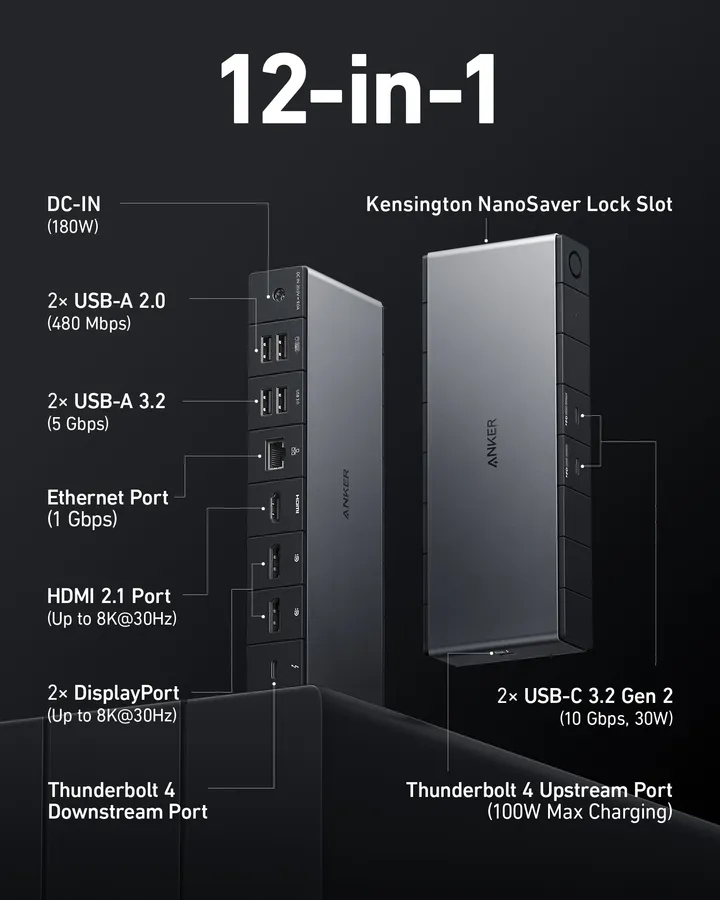
Product at a glance
Anker 778 Thunderbolt Docking Station (12-in-1, Thunderbolt 4)
A twelve-port Thunderbolt 4 dock for hybrid workers who want one cable for charging, Ethernet and up to three or four displays on a supporting laptop.
Pros
- Three dedicated video outputs: HDMI 2.1 and two DisplayPort++
- Up to 100W laptop charging plus two 30W USB-C ports
- Gigabit Ethernet and four USB-A ports for peripherals
Cons
- Laptop charging tops out at 100W
- Multi-display support depends on the host laptop
- Host connection: 1 x Thunderbolt 4 upstream (40 Gbps)
- Video outputs: 1 x HDMI 2.1, 2 x DisplayPort++
- Max displays: 8K single display; up to 4K quad display (host dependent)
- Laptop charging: Up to 100W Power Delivery to the host
- Downstream USB-C: 2 x USB-C 3.2 Gen 2 (30W PD each)
- USB-A: 2 x USB-A 3.2 Gen 1, 2 x USB-A 2.0
- Network: RJ45 Gigabit Ethernet
- In the box: 180W power adapter, 0.7 m Thunderbolt 4 cable
Verdict: who the Anker 778 is for
The Anker 778 is a strong fit for a laptop with a Thunderbolt 4 or USB4 port that draws 100W or less and needs several monitors, wired Ethernet and fast USB-C storage from one cable. It turns a single upstream Thunderbolt 4 connection into twelve ports, according to Anker's product documentation.
The best buyer is someone who docks every morning: plug in one cable, and the laptop charges, joins the wired network and lights up the desk monitors. Readers with a 140W gaming or workstation laptop, or with a USB-C laptop that has no Thunderbolt or USB4 support, should look elsewhere or plan around those limits.
This review compares the published specifications with the questions a desk buyer actually has: will my laptop drive the screens, will it charge fast enough, and are there enough of the right ports.
Verified specifications
The dock offers one Thunderbolt 4 upstream port rated at 40 Gbps, three video outputs and up to 100W of laptop charging. The table lists the specifications Anker publishes for model A83A9.
| Attribute | Anker 778 (12-in-1) |
|---|---|
| Host connection | 1 x Thunderbolt 4 upstream, 40 Gbps |
| Video outputs | 1 x HDMI 2.1, 2 x DisplayPort++ |
| Maximum displays | One 8K display, or up to four 4K displays on a supporting host |
| Laptop charging | Up to 100W Power Delivery |
| Downstream USB-C | 2 x USB-C 3.2 Gen 2, 30W charging each |
| USB-A | 2 x USB-A 3.2 Gen 1, 2 x USB-A 2.0 |
| Network | RJ45 Gigabit Ethernet |
| In the box | 180W power adapter, 0.7 m Thunderbolt 4 cable |
| Security | Kensington NanoSaver slot |
| Weight | 0.59 kg (1.30 lb) |
The 180W external adapter is shared: up to 100W goes to the laptop and the rest powers the dock and its ports, including the two 30W USB-C ports.
Laptop-to-dock compatibility: check your host first

Your laptop, not the dock, decides how many monitors work and at what resolution. A Thunderbolt 4 dock can only pass through the display streams the laptop's port and graphics provide.
| Your laptop port | What to expect | Check before buying |
|---|---|---|
| Thunderbolt 4 (Windows) | Charging, data and multiple displays, up to the limits Anker lists | How many external displays the laptop maker supports |
| USB4 with Thunderbolt support | Usually similar behavior to Thunderbolt 4 | Whether the port is labeled for Thunderbolt or full USB4 video |
| Mac with Thunderbolt or USB4 | Charging and data; display count follows the Mac's chip | The external display limit in your Mac's technical specifications |
| Plain USB-C (no Thunderbolt or USB4) | Reduced or no function | Choose a USB-C dock made for your port instead |
For a step-by-step way to read your laptop's display limit, use our guide on checking whether a laptop supports two monitors through a dock. Do that check before you count on the quad-display figure, which only applies to hosts that support it.
Display setups: single, dual and quad monitors
For most desks, the practical setup is one or two monitors on the HDMI 2.1 and DisplayPort outputs, with three or four screens only on laptops that support that many. Anker lists one 8K display or up to four 4K displays as the top-end configurations.
- One large monitor: connect it to HDMI 2.1 or DisplayPort for the highest single-screen resolution your laptop supports.
- Two monitors: use the two DisplayPort outputs, or one DisplayPort plus HDMI, so each screen has its own port.
- Three or four monitors: the remaining screens rely on the downstream Thunderbolt or USB-C path and your host's display support. Confirm both before buying extra screens.
Use cables that match the resolution and refresh rate you want. An older HDMI cable can hold a 4K monitor back to a lower refresh rate even when the dock and laptop support more.
Charging, ports and daily desk use
Up to 100W of charging covers most thin-and-light and many mainstream laptops, while the port mix covers storage, peripherals and a wired network. The two USB-C 3.2 Gen 2 ports are the fast ones, so use them for portable SSDs. The USB-A 2.0 ports suit a keyboard, mouse or webcam receiver, where speed does not matter.
Gigabit Ethernet keeps video calls stable on desks where Wi-Fi is crowded. Anker also offers its Dock Manager app for firmware updates, which is worth checking when you first set up the dock.
If your laptop's original charger is rated above 100W, the dock will still connect, but the laptop may charge slowly or drain under heavy load. Look at the wattage printed on your laptop's charger to see which case you are in.
Strengths, limitations and who should skip it
The main strengths are the port count, the three dedicated video outputs and 100W charging from one cable; the main limits are the 100W ceiling and the dependence on a Thunderbolt or USB4 host.
- Strengths: twelve ports from one Thunderbolt 4 connection, HDMI 2.1 plus two DisplayPort outputs, two 30W USB-C ports, Gigabit Ethernet and a lock slot.
- Limitations: laptop charging stops at 100W, the included Thunderbolt cable is 0.7 m, and multi-display results vary by laptop.
- Skip it if: your laptop needs more than 100W, has only basic USB-C, or you only need one monitor and a couple of USB ports, where a simpler USB-C hub is enough.
Before you buy, write down three numbers: your laptop's charger wattage, its external display limit and how many monitors you own. If all three fit the table above, the Anker 778 covers the desk.
FAQ
Does the Anker 778 work with a MacBook?
It connects to Macs with Thunderbolt or USB4 ports for charging, data and Ethernet. The number of external monitors depends on the Mac's chip, and some models support only one external display. Check your Mac's technical specifications for its display limit before planning a multi-monitor desk around this dock.
How much power does the Anker 778 give my laptop?
Anker lists up to 100W of Power Delivery charging to the laptop, supplied by an included 180W adapter that also powers the dock and its ports. Laptops with chargers rated above 100W may charge more slowly or lose charge under heavy load while docked.
Can I connect two 4K monitors to the Anker 778?
Yes on most Thunderbolt 4 laptops that support two external displays. Use the two DisplayPort outputs or one DisplayPort and the HDMI 2.1 port, with cables rated for the resolution and refresh rate you want. Your laptop's own display limit still applies.
Will the Anker 778 work with a regular USB-C laptop?
It is designed for Thunderbolt 4 hosts. A laptop with basic USB-C and no Thunderbolt or USB4 support may get reduced or no function. Check your laptop's port label or specifications; if it lacks Thunderbolt or USB4, a USB-C dock built for that port is the safer choice.
What comes in the box with the Anker 778?
According to Anker's documentation, the box includes the dock, a 180W power adapter and a 0.7 m Thunderbolt 4 cable. If your laptop sits farther from the dock, plan for a longer certified Thunderbolt 4 cable.
Sources
- Anker: Introduction to Anker 778 Thunderbolt Docking Station (12-in-1, Thunderbolt 4) — checked 2026-11-20
- Anker Dock Manager — checked 2026-11-20
Ready to decide?
Check the current listing for the Anker 778 Thunderbolt Docking Station (12-in-1, Thunderbolt 4) on Amazon.
View on Amazon